Verifying signatures
Gitember can check SSH and GPG (OpenPGP) signatures on commits. History is not verified while it loads — Gitember only records whether a commit carries a signature. Cryptographic verification runs on demand, when you open the signature dialog.
Git object (commit)
        │
        ├── no signature  →  Unsigned  (no icon)
        └── has signature →  Signed
                                │
                     user clicks the icon
                                │
                         SignatureVerifier
                                │
                   ┌────────────┼────────────┐
                   │            │            │
              Verified      Invalid      Unknown
Turning verification on
- Open File → Settings → Commit Signing.
- Check Verify commit signatures.
- Choose where allowed signers are read from (SSH only):
~/.ssh/allowed_signers— one file for all repositories on this machine..git/allowed_signers— a file inside the current repository.
- Click OK.
When the global file is selected, Edit… opens ~/.ssh/allowed_signers and
Edit revoked keys… opens ~/.ssh/revoked_keys.
When the repository file is selected, Project Settings grows an Edit .git/allowed_signers… button.
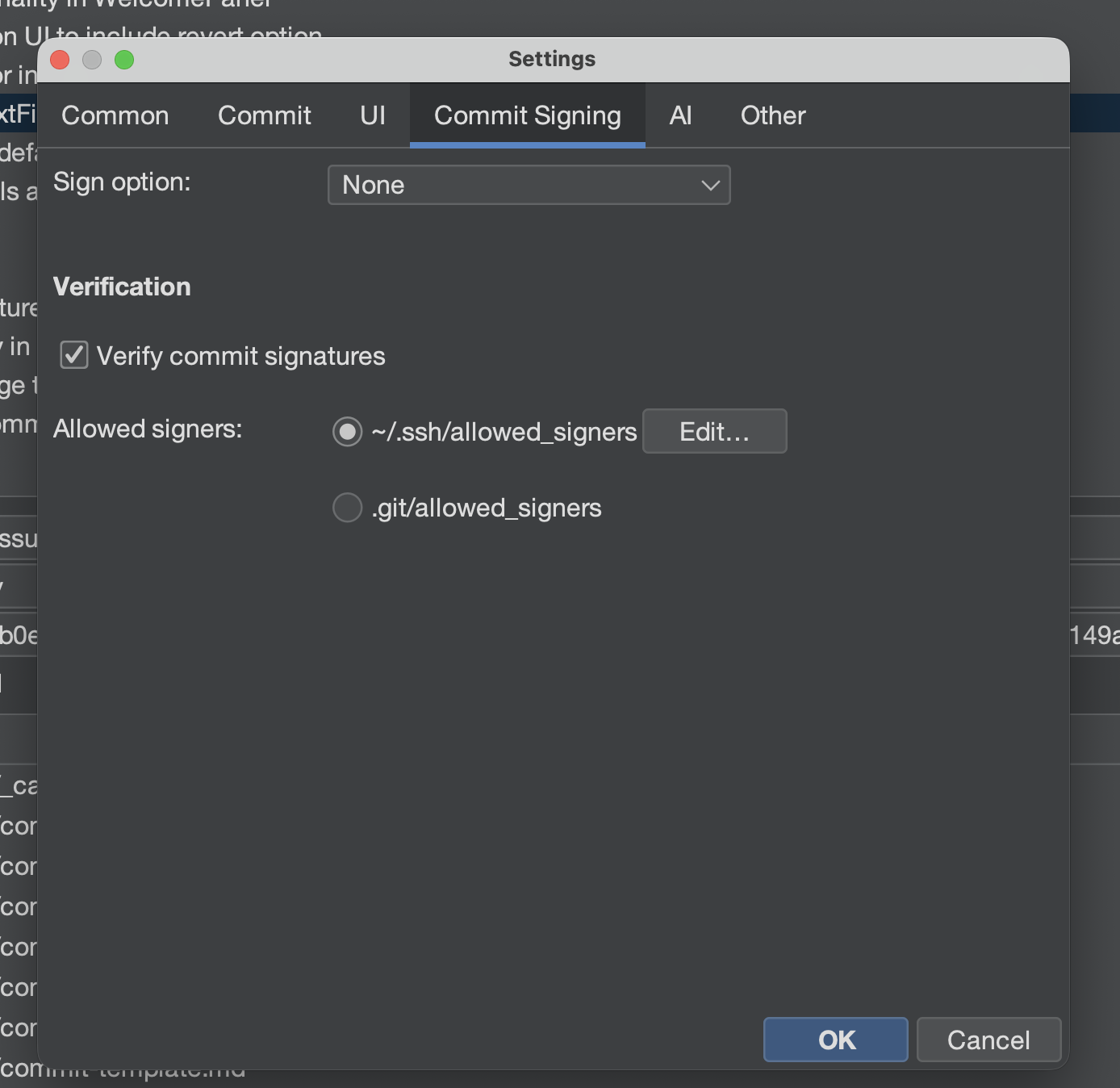
GPG signatures are verified against your local OpenPGP keyring. The allowed-signers file is used for SSH signatures.
Allowed signers file format
.pub file as-isThe allowed_signers record is not the same as an SSH public-key (.pub) file.
A .pub line starts with the key type. An allowed-signers line must start with the
principal (usually the committer email) and, for Git, should include namespaces="git".
A typical id_ed25519.pub (what ssh-keygen writes, and what Gitember's signing
setting points at) looks like:
ssh-ed25519 AAAAC3NzaC1lZDI1NTE5AAAAIExampleKeyMaterialHere igor@laptop
The last token is only a comment. Git does not treat it as the signer identity.
An allowed_signers line for the same key looks like:
igor@example.com namespaces="git" ssh-ed25519 AAAAC3NzaC1lZDI1NTE5AAAAIExampleKeyMaterialHere
| Field | .pub file | allowed_signers |
|---|---|---|
| First token | Key type (ssh-ed25519, ssh-rsa, …) | Principal — email or identity Git should accept |
| Git namespace | Not used | namespaces="git" — required, Git SSH signatures use the git namespace |
| Key type + base64 | Present | Present, after the principal and options |
| Comment | Optional trailing comment | Optional; not used as the principal |
Copy the key type and the base64 blob from the .pub file, then prefix the principal and
namespaces="git". If you drop a raw .pub line into allowed_signers, verification will
fail even though the key itself is correct.
Several principals can share one key (comma-separated):
igor@example.com,igor@company.com namespaces="git" ssh-ed25519 AAAAC3NzaC1lZDI1NTE5AAAAIExampleKeyMaterialHere
One identity can also have several keys, each on its own line.
Revoked keys
~/.ssh/revoked_keys lists SSH keys that must no longer verify. Gitember passes this file to
JGit as gpg.ssh.revocationFile when it exists. The format is OpenSSH's revocation list
(plain public keys or a binary KRL), not an allowed_signers file and not a .pub comment
line.
Seeing signed commits in History
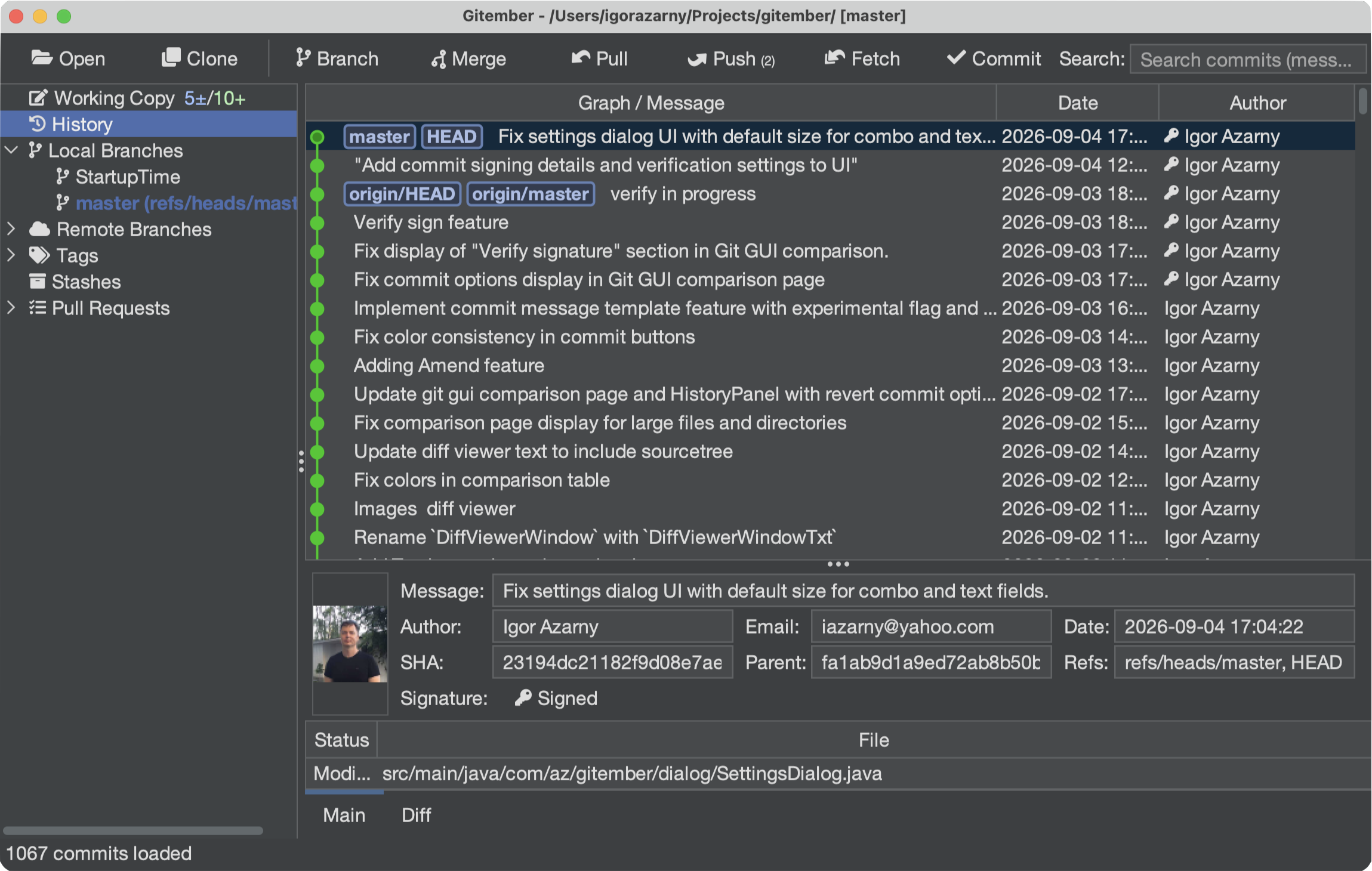
Signed commits show a key icon in the Author column. Unsigned commits have no icon. The icon means “this commit has a signature”, not “it is trusted”.
Click the icon to open the signature dialog and run verification.
Add history-signed-author.png here (History table, Author column, key icon on a signed commit).
Commit detail and the signature dialog
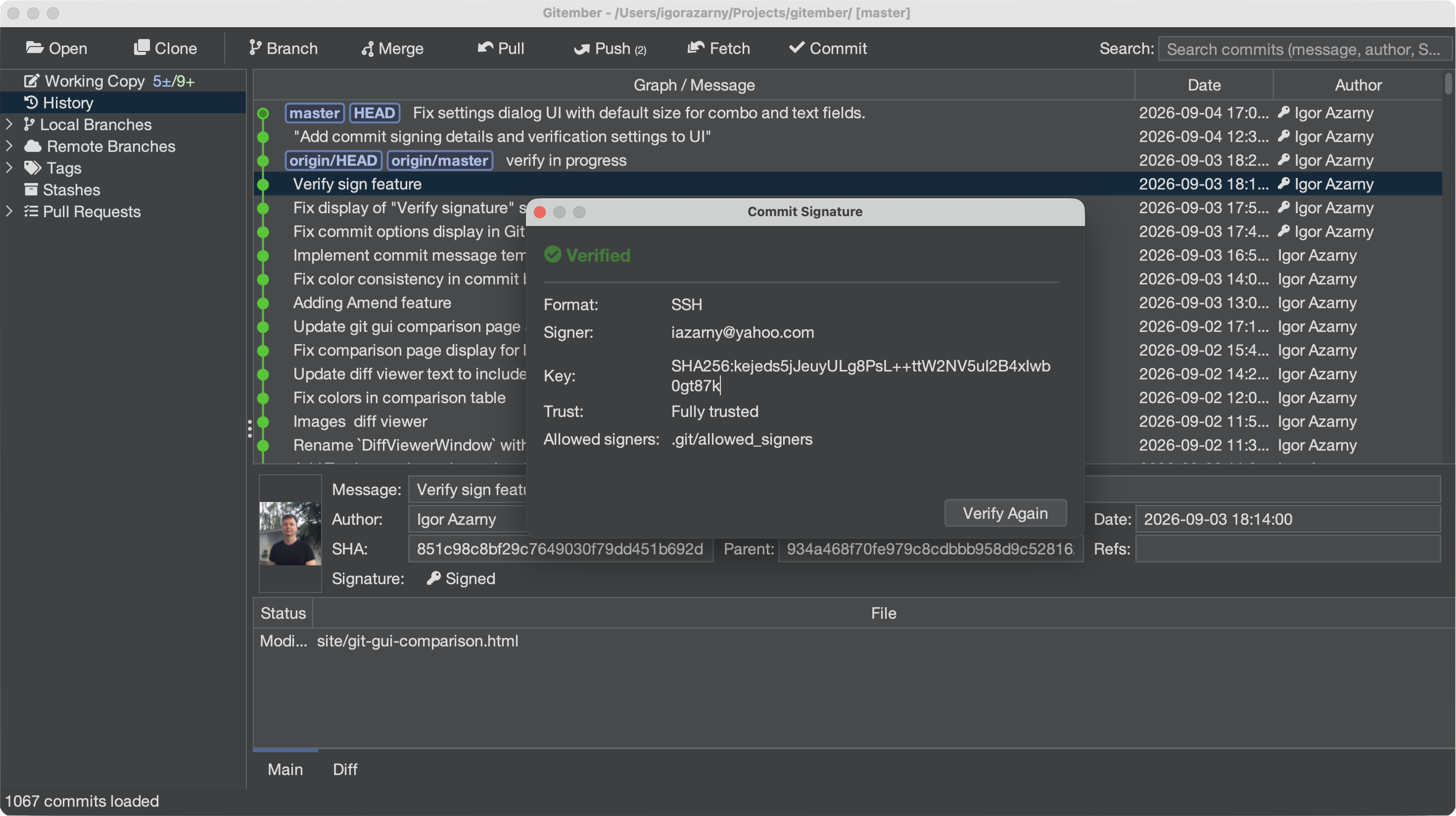
Select a signed commit. The detail pane adds a Signature row (hidden for unsigned commits). Click it to open the same non-modal dialog.
The dialog shows:
- Status: Verified, Invalid, Unknown, or Signed (verification off)
- Format — SSH or GPG
- Signer
- Key fingerprint
- Trust (for example Fully trusted)
- Allowed signers —
~/.ssh/allowed_signersor.git/allowed_signers - Verify Again
Add commit-signature-dialog.png here (the Commit Signature dialog: Verified, Format SSH,
Signer, Key, Trust, Allowed signers, Verify Again).
| Status | Meaning |
|---|---|
| Signed | A signature is present; it has not been checked yet, or verification is turned off in Settings. |
| Verified | The signature matches an allowed SSH signer or a trusted GPG key. |
| Invalid | The signature is present but does not check out (wrong key, revoked key, bad payload). |
| Unknown | The format has no verifier, or verification could not complete. |
Summary
- Turn on Verify commit signatures under Settings → Commit Signing.
- SSH trusted keys go in
allowed_signers— not a copy of a.pubfile. - History only flags signed commits; click the icon (or the detail-pane Signature row) to verify.
- Use Verify Again after you edit
allowed_signersorrevoked_keys.